Berselancar di internet memang menuntut kebijakan dan kehati-hatian
supaya terhindar dari hal-hal yang tidak diinginkan. Salah satunya
adalah ancaman program malmare yang tanpa kita sadari sering kita
"undang" ke komputer kita. Penyebabnya seringkali karena kecerobohan dan
kebiaaan kita yang sering menggunakan jurus "the power of next" - alias selalu menekan tombol next atau OK apabila ada message yang keluar.
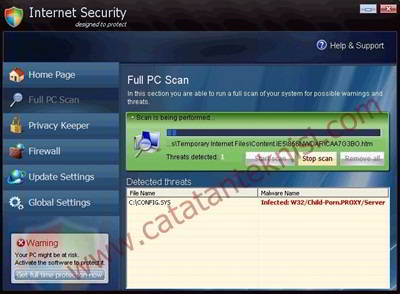
Misalnya saja cerita tentang teman saya yang tanpa sengaja mendownload dan menjalankan program IESecurity.exe, sebuah malware yang menyamar menjadi program Antivirus. Malware IESecurity ini akan memunculkan jendela Internet Security yang seolah-olah menscan komputer dan mendeteksi aplikasi-aplikasi berbahaya. Semua program yang akan saya jalankan seperti misalnya Ms Office, Firefox dsb tidak bisa diaktifkan dan muncul error bahwa aplikasi tersebut terkena virus.
Untuk menghapus malware Internet Security ini berikut langkah-langkah yang saya jalankan:
READ MORE
Misalnya saja cerita tentang teman saya yang tanpa sengaja mendownload dan menjalankan program IESecurity.exe, sebuah malware yang menyamar menjadi program Antivirus. Malware IESecurity ini akan memunculkan jendela Internet Security yang seolah-olah menscan komputer dan mendeteksi aplikasi-aplikasi berbahaya. Semua program yang akan saya jalankan seperti misalnya Ms Office, Firefox dsb tidak bisa diaktifkan dan muncul error bahwa aplikasi tersebut terkena virus.
Untuk menghapus malware Internet Security ini berikut langkah-langkah yang saya jalankan:
- Jalankan komputer dalam mode "Safe Mode"
- Cari dan Delete file dan folder yang berhubungan dengan ie-security, berikut nama file dan foldernya:
- %USERPROFILE%\Desktop\IE-Security.lnk
- %USERPROFILE%\Start Menu\Programs\IE-Security.lnk
- %PROGRAMFILES%\IE-Security\
- isecurity.exe yang terdapat di jendela C:\Documents and Settings\[UserName]\Application Data klo di Windows 7 lokasinya terdapat di C:\Users\[UserName]\AppData\Roaming\ .
- Jalankan regedit, cari nama key ie-security, saya menemukan 2 key yang saya delete yaitu ieSecurity.exe dan winscas.txt. Berikut list key yang mesti di delete:
- HKEY_LOCAL_MACHINE\SOFTWARE\IE-Security<
- HKEY_LOCAL_MACHINE\SOFTWARE\Microsoft\Windows\CurrentVersion\Run\IE-Security
- HKEY_LOCAL_MACHINE\SOFTWARE\Microsoft\Windows\CurrentVersion\Uninstall\IE-Security
- Reboot komputer.

Setelah sebelumnya Microsoft merilis Windows 8 Developer Preview untuk
para pengembang aplikasi pada bulan September 2011, tanggal 29 Februari
2012 yang lalu Microsoft secara resmi merilis Windows 8 versi Beta atau
disebut Windows 8 Consumer Preview. Konon katanya sekitar 100.000 perubahan atau perbaikan telah dilakukan dibanding versi Developer Preview.
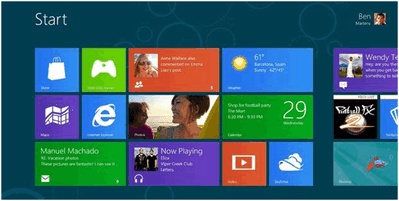
Windows 8 ini merupakan Sistem Operasi teranyar dari Microsoft yang membuat banyak orang penasaran karena banyaknya perubahan pada sisi tampilan terutama yang disebut sebagai antarmuka Metro, yaitu tampilan berpetak-petak yang mengacu pada antarmuka yang digunakan di platform Windows Phone saat ini. Pengguna Windows 8 nantinya akan banyak menggunakan metode geser (sliding) untuk mengakses menu atau aplikasi.
Windows 8 ini diklaim merupakan Sistem Operasi yang lebih baik dari pendahulunya Windows 7 dan diharapkan akan sukses sebagai sistem operasi untuk semua perangkat dari komputer desktop sampai tablet, ultrabook dan smartphone. Tetapi dalam versi betanya Microsoft tidak menjamin semua aplikasi akan dapat berfungsi dengan baik.
Windows 8 System Requirements
Windows 8 Consumer Preview works great on the same hardware that powers Windows 7:
Windows 8 versi beta atau Consumer Preview ini bisa kita download dan digunakan secara gratis sampai versi finalnya tersedia. Filenya lumayan besar sekitar 2.5 GB untuk Windows 8 versi 32 bit dan sekitar 3,3 GB untuk Windows 8 versi 64 bit. Memanfaatkan koneksi internet di kantor, saya membutuhkan waktu sekitar 2 jam lebih untuk mendownloadnya. Klo temen-temen ingin mendownload Windows 8 Consumer Privew, silangkan langsung ke TKP [disini].
READ MORE
Windows 8 ini merupakan Sistem Operasi teranyar dari Microsoft yang membuat banyak orang penasaran karena banyaknya perubahan pada sisi tampilan terutama yang disebut sebagai antarmuka Metro, yaitu tampilan berpetak-petak yang mengacu pada antarmuka yang digunakan di platform Windows Phone saat ini. Pengguna Windows 8 nantinya akan banyak menggunakan metode geser (sliding) untuk mengakses menu atau aplikasi.
Windows 8 ini diklaim merupakan Sistem Operasi yang lebih baik dari pendahulunya Windows 7 dan diharapkan akan sukses sebagai sistem operasi untuk semua perangkat dari komputer desktop sampai tablet, ultrabook dan smartphone. Tetapi dalam versi betanya Microsoft tidak menjamin semua aplikasi akan dapat berfungsi dengan baik.
Windows 8 System Requirements
Windows 8 Consumer Preview works great on the same hardware that powers Windows 7:
- Processor: 1 gigahertz (GHz) or faster
- RAM: 1 gigabyte (GB) (32-bit) or 2 GB (64-bit)
- Hard disk space: 16 GB (32-bit) or 20 GB (64-bit)
- Graphics card: Microsoft DirectX 9 graphics device or higher
- To use touch, you need a tablet or monitor that supports multitouch
- To access Windows Store and to download and run apps, you need an active Internet connection and a screen resolution of at least 1024 x 768
- To snap apps, you need a screen resolution of at least 1366 x 768
Windows 8 versi beta atau Consumer Preview ini bisa kita download dan digunakan secara gratis sampai versi finalnya tersedia. Filenya lumayan besar sekitar 2.5 GB untuk Windows 8 versi 32 bit dan sekitar 3,3 GB untuk Windows 8 versi 64 bit. Memanfaatkan koneksi internet di kantor, saya membutuhkan waktu sekitar 2 jam lebih untuk mendownloadnya. Klo temen-temen ingin mendownload Windows 8 Consumer Privew, silangkan langsung ke TKP [disini].
Bagi temen-temen yang mengalami problem komputer yang disebabkan setingan yang salah (misconfiguration) pada windows services atau registry Windows, temen-temen bisa mencoba sebuah software yang bernama Refresh PC dari WareSoft Software.

Refresh PC adalah sebuah tools yang berguna untuk mengembalikan kondisi settingan registry dan system service windows ke kondisi default. Berikut beberapa fitur utama Refresh PC:
READ MORE
Refresh PC adalah sebuah tools yang berguna untuk mengembalikan kondisi settingan registry dan system service windows ke kondisi default. Berikut beberapa fitur utama Refresh PC:
- Mengurangi terjadinya error pada Event Viewer
- Memperbaiki setingan system services yang salah (misconfiguration) yang dapat menyebabkan berbagai problem seperti waktu booting yang lambat.
- Membersihkan temporary folders yang tidak terpakai.
- Mengembalikan setingan registry ke kondisi default


official validation of Microsoft
You do not need to use cracks and stuff,
install and use as if you have a licensed copy.
This so-called "student" copy of XP,
it is used for educational purposes and there fore
it is designed for multiple installation without
further contact with black-list Windows Genuine Advantage.
This version of Windows XP SP3 does not require activation
and is the official validation of Microsoft.
no need for any wga cracks with this one
it passes online as fully Genuine
(student edition based + proper student key)
to check if xp is activated
goto start/run and enter the following
oobe/msoobe /a
this windows was made with xp professional student edition sp0 RTM 32bit as the source disk,
with Sp3 Build 5512 added and upto date hotfixes added
the cd-key is slipstreamed into the cd so no need to put when installing from system bootup
if you need the key for some reason browse the cd for a txt document
tcp ip = 16777215
uxtheme applyed (can use unsigned themes)
Default windows language ENGLISH/UK
please change to your own language when installing.
you can also use 'Regional and Language Options' after if need
be in Control panel.
i burned the iso image with nero.. this will just about fit on a 700 MB cdr-rom..
please do a clean install from system bootup with this windows disk.
this is not a upgrade disk as those parts were removed to make space for better stuff.
------------------------------------------------------------------------
ADDED TO THE INSTALL DISK
Framework all in one 2.0 - 4.0
Internet explorer 8
Windows media player 11
Directx 9 Runtimes June 2011 (32bit only)
Directx Managed Code 1.1.0 (32bit only)
c++ runtimes 2005 & 2008 & 2010
Shockwave 11.6.3.634
Flash activeX 11.2.202.221
Java 7.0 update 4
winrar 4.11
------------------------------------------------------------------------
REMOVED FROM THE INSTALL DISK
Music Samples
Tour
Windows messenger
REMOVED FOLDERS FROM THE INSTALL DISK
SUPPORT , VALUEADD , DOCS , WIN9XMIG , WIN9XUPG , WINNTUPG
------------------------------------------------------------------------
ADDED TO THE INSTALL DISK
Driverpacks base 10.06
DriverPacks BASE is an integration program that will take
individual DriverPacks and integrate them into a local
32-bit Windows source for installation.
DRIVERPACKS ADDED
Chipset 12.01
Cpu 10.05
Lan 12.02
MassStorage 12.01 txt mode (sata + raid)
Wlan 11.09
Monitor 10.05
Drivers are installed only for the hardware on your system. Excess drivers are removed.
THE UPDATES (hotfixes)
SFC (windows File Protection) Disabled
Numlock off
control panel changable default/classic
updated windows hotfixes till March 13th 2012
updated Flash activeX 11.2.202.221


DOWNLOAD

General Infos:
* This is the original Windows XP Professional SP3 32-bit (Volume License) ISO from Microsoft.
* The installation process is
Unattended with the Prompt repair option.
* This Windows XP is updatable a Valid WGA CD-Key is already inserted and a WGA crack will be also
installed and a Windows XP Activation is not required.
* Includes all official and some unofficial Windows XP Service Pack 3 Updates till 14.3.2012. *
Over 200 MB integrated drivers for SATA/ACHI, LAN, WLAN and
Monitors.
* A lot of Windows XP settings have been already set and are also set for new created Windows XP accounts.
* Includes a Codec Pack that will
decode and encode almost every Audio and Video file format.
* Booting and
Running a little bit faster because some worthless Windows XP files and
Programs are removed and all the Windows XP Updates are slipstreamed.
* After the Windows XP installed you can choose if you want the
Preconfigured Settings and the Extra Programs to be implemented,
When nothing was selected after 60 seconds then the option Yes will be
automatically selected.
CHANGELOG
.
2012.3.17 Changelog:
* Updated DriverPack MassStorage form "v12.01" to "v12.03".
Updated DriverPack WLAN from "v11.09" to "v12.02".
Updated Flash Player ActiveX Control form "v11.1.102.62" to "v11.1.102.63". * Updated Microsoft Runtime Visual C-family v10.
Updated Windows XP Root Certificates Update (KB931125) from "Version
November 2011" to "Version February 2012".
* Updated Tweak "Suppressing
Microsoft Update nagging to install Windows Malicious Software Removal Tool
(KB890830)" from "v4.5.5900" to "v4.6.6000".
* Integrated all Windows XP
Service Pack 3 Updates form 15.2.2012 till 14.3.2012
* This is the original Windows XP Professional SP3 32-bit (Volume License) ISO from Microsoft.
* The installation process is
Unattended with the Prompt repair option.
* This Windows XP is updatable a Valid WGA CD-Key is already inserted and a WGA crack will be also
installed and a Windows XP Activation is not required.
* Includes all official and some unofficial Windows XP Service Pack 3 Updates till 14.3.2012. *
Over 200 MB integrated drivers for SATA/ACHI, LAN, WLAN and
Monitors.
* A lot of Windows XP settings have been already set and are also set for new created Windows XP accounts.
* Includes a Codec Pack that will
decode and encode almost every Audio and Video file format.
* Booting and
Running a little bit faster because some worthless Windows XP files and
Programs are removed and all the Windows XP Updates are slipstreamed.
* After the Windows XP installed you can choose if you want the
Preconfigured Settings and the Extra Programs to be implemented,
When nothing was selected after 60 seconds then the option Yes will be
automatically selected.
CHANGELOG
.
2012.3.17 Changelog:
* Updated DriverPack MassStorage form "v12.01" to "v12.03".
Updated DriverPack WLAN from "v11.09" to "v12.02".
Updated Flash Player ActiveX Control form "v11.1.102.62" to "v11.1.102.63". * Updated Microsoft Runtime Visual C-family v10.
Updated Windows XP Root Certificates Update (KB931125) from "Version
November 2011" to "Version February 2012".
* Updated Tweak "Suppressing
Microsoft Update nagging to install Windows Malicious Software Removal Tool
(KB890830)" from "v4.5.5900" to "v4.6.6000".
* Integrated all Windows XP
Service Pack 3 Updates form 15.2.2012 till 14.3.2012


DOWNLOAD

Tools buatan orang Turkey ini sangat luar biasa, tools ini berfungsi untuk menyusup ke komputer orang lain. Caranya sangat gampang dan mudah sekali, tinggal kita mengetahui IP dan Port komputer korban, maka kita dapat langsung menginfeksinya.
A. Cara penggunaan ProRat
1. Pertama kali kita harus mengetahui terlebih dahulu IP dan Port korban yang terbuka. Kita dapat melakukannya dengan cara manual atau juga dengan bantuan Ports Scanner. download di sini

Dari gambar diatas kita mengetahui semua IP komputer yang aktif dan Port mana saja yang terbuka. Yang akan dijadikan korban pada percobaan kita kali ini adalah komputer dengan IP 192.162.10.233.
2. Langkah selanjutnya yaitu kita jalankan ProRat, tools ini dapat di download di sini . Sebelumnya matiin dulu Anti Virus kamu (disable), karena ProRat akan terdeteksi sebagai virus. Padahal dia tidak berbahaya bagi komputer kita. Setelah itu isikan IP korban pada form IP dan Portnya (default 5110).

Apabila kita klik tombol Connect maka koneksi ke komputer korban belum bisa, karena komputer korban belum kita infeksi. Untuk menginfeksi komputer korban kita terlebih dahulu membuat server yang akan dijalankan pada komputer korban. Caranya klik tombol Create – Create Prorat Server. Lalu muncul tampilan Notifications :

Centang pilihan Use Proconnective Notifications dan isi IP(DNS)Address dengan IP kita. Pada tab General Setting kita isikan Server Port (default 5110), Server Password dan Victim Name.

Pada tab Bind with File kita dapat menyusupkan file yang akan dijalankan bersama Server. Extensi file bebas.

Selanjutnya adalah tab Server Extension, ada beberapa pilihan extensi server. Kita pilih yang berekstensi .Exe.

Untuk membuat icon server kita klik tab Server Icon, pilih icon apa saja yang kamu inginkan.

Langkah terakhir dari pembuatan server ini adalah klik Create Server.

Setelah berhasil, akan tampil :

3. Kita tinggal menjalankan Server tersebut dikomputer korban. Caranya terserah kamu… mau disusupkan diam-diam atau memakai teknik Social Engineering dan juga dapat kamu infeksikan langsung pada komputer tersebut (kalo bias sihh).
4. Setelah Server tersebut berhasil berjalan pada komputer korban, maka kita langsung mencoba mengkoneksikannya dengan komputer kita.
5. Untuk koneksi kita dapat menggunakan ProConnective atau langsung mengetikkan IP address dan Port komputer korban. ProConnective adalah tools bawaan dari ProRat yang berfungsi sebagai Bridge (jembatan koneksi) antara komputer server dan komputer client (korban). Akan nampak IP korban apabila dia sedang on.

6. Setelah berhasil melakukan koneksi ke komputer korban maka status dari ProRat akan berubah dari Disconnected ke Connected

7. Nah…saatnya kita bermain. Ada banyak hal yang dapat kita lakukan pada komputer korban seperti mengetahui informasi dari PC, mengirimkan pesan error, mematikan komputer, mengunci mouse, membuka CD-ROM atau bahkan memotret wajah korban .
8. Sekarang kita akan melihat PC info korban :

Dari gambar diatas kita dapat melihat informasi yang dimiliki dari komputer korban.
9. Kita juga dapat mengirimkan pesan error palsu ke komputer korban :

10. Memasang Keylogger.

11. Dan yang paling seru adalah melihat wajah dari korban yang kita hack.

Bagaimana seru kan? Itu masih sebagian kecil dari kegunaan ProRat masih banyak lagi fungsi lainnya, seperti memformat hardisk milik korban, mengacaukan registry, mencuri data-data penting dan lain sebagainya. Akan tetapi, dalam pembahasan kita kali ini kita cukupkan sekian saja ya. Ok !
Gunakan dengan baik ya…
B. Cara Pencegahan
1. Update selalu Anti Virus anda agar mampu mendeteksi adanya infeksi dari ProRat. Biasanya server ProRat terdeteksi sebagai
Trojan.Dropper.Prorat.DZ.29, Dropped:Backdoor.Prorat.DZ.
2. Pasanglah Anti Prorat, anda bisa mendownloadnya di sini.
Selamat mencoba…


